The self-hosted AI gateway

One gateway between your people and every AI provider.

Janus Edge speaks the OpenAI API, so the tools your teams already use keep working without changes. Every request is checked against your single sign-on, priced at the provider's real rate, attributed to a person and a team, and logged. It all runs on your own network, and prompts are never stored unless you ask.

Free for up to 25 people. Works with OpenAI, Anthropic, AWS Bedrock, Google Vertex, Ollama and any OpenAI-compatible server.

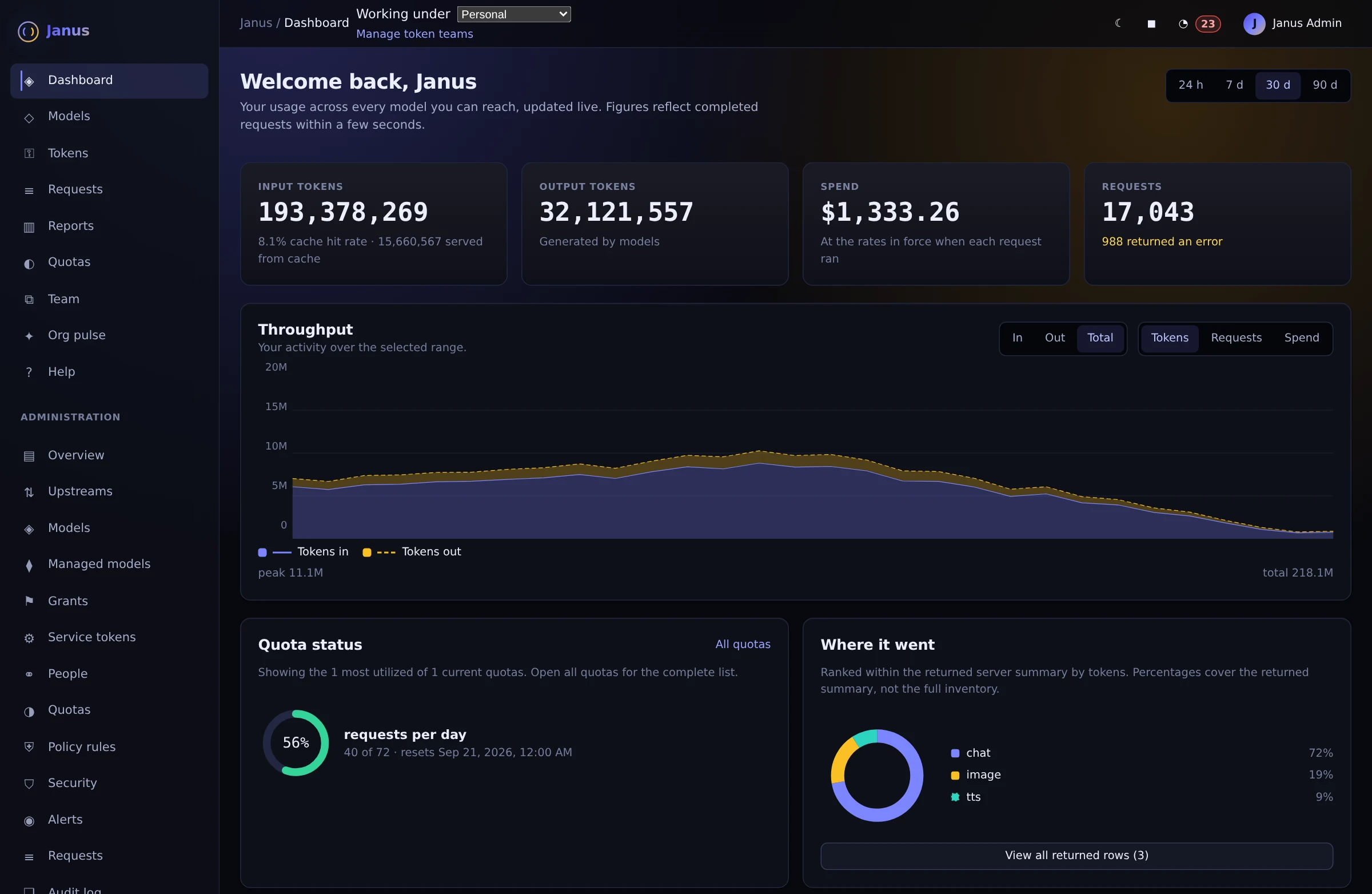
Janus a dashboard for every person with illustrative demo data
A dashboard for every person

See usage trends, throughput, costs, and remaining quota without asking an administrator.

Actual Janus interface · Demo identities and synthetic usage
Where it sits

Every AI request passes through one checkpoint you control.

Janus Edge runs on your network, between the people and apps that use AI and the models that answer them. It speaks the same API as OpenAI, so nothing on either side needs to change. What changes is that every request now has a name on it, a limit around it and a price next to it.

Where Janus Edge sits People and apps on your network send AI requests to Janus Edge. Janus checks who is asking, whether they are allowed the model, whether they have budget, and whether the prompt contains secrets. Then it forwards the request to a cloud provider or a model on your own GPUs and records the cost. YOUR NETWORK CLOUD PROVIDERS PRPriyaEngineering · coding agent MAMarcusSupport · chat assistant DADanaFinance · notebook CIrelease-botCI pipeline · service token Janus Edge checks every request, in order Who is asking?Single sign-on identity Are they allowed this model?Grants Is there budget left?Quotas Anything secret in the prompt?Guardrails What did it cost?Metering and audit log OpenAI Anthropic AWS Bedrock Google Vertex Your GPUsOllama · vLLM · TEInever leaves the site Requests leave your network only after every check passes. Where Janus Edge sits: people and apps send requests through Janus, which checks identity, grants, budget and secrets before forwarding to your own GPUs or to cloud providers. YOUR NETWORK PriyaEngineering MarcusSupport DanaFinance release-botCI pipeline Janus Edge Who is asking?Single sign-on Allowed this model?Grants Budget left?Quotas Anything secret?Guardrails What did it cost?Metering and audit Your GPUsOllama · vLLM · TEI, stays on site CLOUD PROVIDERSOpenAI · AnthropicBedrock · Vertex
Requests from people, notebooks, agents and CI jobs all go through the same checks. Traffic to your own GPUs never leaves the building.
Why you need it

Six problems you hit the day AI goes company-wide.

Handing out provider API keys works for a pilot. Once hundreds of people and a dozen internal tools are calling models, the same questions come up at every company. Here is how Janus answers each one.

01 · Cost you can explain

A provider key tells you what you spent. Not who spent it.

When everyone shares an API key from OpenAI or Anthropic, you get one invoice at the end of the month and no way to explain it.

You can't tell which team drove the bill, which script is looping all weekend, or whether anyone is getting value out of it. Janus gives every person, team and service its own key and meters each request at the provider's real price, so the invoice comes with a breakdown and you can set budgets before the money is spent, not after.

How metering works →
With one shared provider key you get one invoice and no idea who spent it. With Janus, the same $48,210 is broken down by team. ONE SHARED PROVIDER KEY PR MA DA one key Provider INVOICE $48,210 Who used it? On what? WITH JANUS PR MA DA own keys Janus SPEND BY TEAM Engineering$21.4k Data science$10.9k Support$9.8k Marketing$6.1k
02 · Grants

Keep the most expensive models for the work that needs them.

The best frontier models can cost many times more than a fast model that writes a perfectly good email.

Grants let you decide who gets which model. Engineering and data science can have the frontier model for hard problems, while everyone else gets fast, inexpensive models for day-to-day writing. Nobody gets a model just by signing in, and a request for a model someone hasn't been granted is refused with a clear message.

How grants work →
A grants matrix: Engineering and Data science can use the frontier model; Support and Marketing get the fast model; everyone gets the small and self-hosted models. Frontier$$$$ Fast$$ Small$ On siteyour GPUs Engineering Data science Support Marketing Everyone Marketing asks the frontier model to draft an email. Refused, because Marketing isn't granted that model. The fast model writes the same email for a fraction of the cost.
03 · Managed models

Models change every month. Your apps shouldn't have to.

New models launch constantly, prices drop, and older versions get retired. Nobody else in the company should have to keep up.

With managed models, your AI specialists watch the landscape and choose the right model for each job. Apps call a stable name such as chat-default, and when something better or cheaper comes along, the team points that name at the new model. Every app picks it up at once, without a code change. New models stay switched off until someone has tried them.

How managed models work →
Three apps all call the stable name chat-default. Over time the AI team repoints chat-default from Model A to the cheaper Model B and then the faster Model C, while a preview Model D stays disabled. Support bot Code review Docs search chat-default the name apps use Model Athe old default Model Bhalf the price Model Cfaster, smarter Model Dpreview · off The apps never change. Your AI team decides what chat-default means.
04 · Security

Stop passwords and tokens before they leave your network.

People paste config files, stack traces and logs into AI tools every day, and credentials come along for the ride.

Janus inspects each prompt at your network edge. When it finds a password, an API key or a cloud credential, it either removes the secret and sends the rest, or blocks the request outright and tells the person why. Either way, the secret never reaches an outside provider, and the decision is recorded for your security team.

How the guardrails work →
A prompt containing a database password and a cloud secret key reaches Janus at your network edge. Janus either redacts the secrets and sends the rest, or blocks the request so nothing is sent. PROMPT FROM PRIYA Why won't this connect? export DB_PASSWORD=Hunter2!prod aws_secret_access_key=wJalrXUtnFEMI… password cloud secret YOUR NETWORK EDGE Janus checks REDACT export DB_PASSWORD= [REDACTED] aws_secret_access_key= [REDACTED] The rest of the prompt goes to the provider. BLOCK Request blocked Priya is told to remove the credentials and retry. Nothing was sent.
05 · Unified access

One key for cloud models and the ones on your own GPUs.

Teams end up juggling a different endpoint, SDK and key for every provider, plus another set for the models you host yourself.

Janus puts all of them behind a single endpoint and a single key. Cloud models from OpenAI, Anthropic, Bedrock and Vertex sit next to self-hosted models on Ollama, vLLM or TEI, and the model name decides where each request goes. Sensitive work can stay on your own hardware without anyone learning a new tool.

Supported providers →
One OpenAI client with one Janus key calls claude-sonnet, which goes to a cloud provider, and llama-local and bge, which run on your own GPUs. client = OpenAI( base_url= "https://ai.corp/v1", api_key="je_7f3c…") client.chat( model="claude-sonnet") client.chat( model="llama-local") client.embed(model="bge") Janus CloudOpenAIAnthropicBedrock Your GPUsOllamavLLMTEI One key, one endpoint, every model. The model name decides where each request goes.
06 · Troubleshooting mode

When an AI feature breaks, see exactly what the model saw.

A failed AI call is hard to debug from a status code. The cause is usually buried in a system prompt, a tool definition or a message three turns back.

Janus doesn't store prompts by default. When something isn't working, an administrator turns on a troubleshooting capture for a set time, limited to a team, a model or just the errors. Janus records the entire context, including system prompt, messages, tool calls and the provider's response. Once you've found the problem, one button purges the lot.

How captures work →
A support bot request fails with a 400 error. An administrator turns on a troubleshooting capture limited to the Support team and errors for 30 minutes, and the captured request shows the full system prompt, messages, tools and the provider's error. REQUESTS 200chat · support-bot1.2 s 200embeddings · docs-search0.3 s 400chat · support-bottool call rejected Troubleshooting capture team = Support · errors only 30 min CAPTURED REQUEST system: You are Acme's support assistant. user: Refund order #4417, it arrived broken. tools: lookup_order, issue_refund assistant → issue_refund( amount: "$40.00") provider 400: amount must be a number The whole context in one place. Purge it when you're done.
Why the name

Janus looked two ways at once. So does this gateway.

The Roman god of gateways had one face turned inward and one turned outward. Janus Edge works the same way: it watches over the people using AI on one side and the providers serving it on the other, and it keeps both honest.

Inward, toward your people

People sign in once and see only what they've been given.

Janus uses the identity provider you already run, whether that's Okta, Entra ID, Authentik, Keycloak or AD FS. Signing in doesn't grant anything by itself; access to each model is something an administrator hands out.

  • Personal API tokens people can create and revoke themselves
  • Team tokens for CI jobs, agents and internal apps
  • Quota warnings at 80% and 95%, well before anyone hits a wall
  • Any OpenAI-compatible client, from IDEs to notebooks to scripts

Outward, toward your providers

Every provider behind one API, at the prices you actually pay.

One catalog covers OpenAI, Anthropic, AWS Bedrock, Google Vertex, Ollama, Hugging Face TEI and any OpenAI-compatible server. Janus translates between them, so your clients only ever need to speak one API.

  • Chat, embeddings, images, audio, Responses, Assistants and files, streamed without buffering
  • Automatic fallback when a model or provider goes down
  • Passwords and API keys caught in prompts, then redacted or blocked
  • Cost by user, team and token, with CSV export

Yours to run, with nothing phoning home.

Janus Edge is a single Go binary with the admin interface built in. Install the Linux release or try it in Docker, and when you're ready for production, point it at PostgreSQL. Air-gapped networks are an ordinary deployment for us, not a special case.

Read the install guide
Install
Linux server installer with HTTPS, Helm chart or Docker image
Database
SQLite to evaluate, PostgreSQL in production
Prompts
Not stored. Troubleshooting captures are opt-in and time-limited.
Licensing
Signed license files, verified offline on the gateway
Source
Readable and auditable under the Elastic License 2.0

Start free with up to 25 people. Pay per seat when you grow.

There's no sales call to get started and no fee tied to your AI spend. When you need a contract, air-gapped licensing or an SLA, talk to us about Enterprise.