Security gateway

Mandatory policy floor and explain

A mandatory baseline no team can loosen, and an explainer that shows which checks apply to anyone.

What it is

Mark an organization-wide policy as mandatory and narrower bindings can only tighten it. 'Explain effective policy' shows exactly which checks apply to any person and model, and a dry run tests text against them.

Why you want it

Security teams need a baseline no one can relax, and a quick answer to 'why was this blocked' or 'is this person covered'.

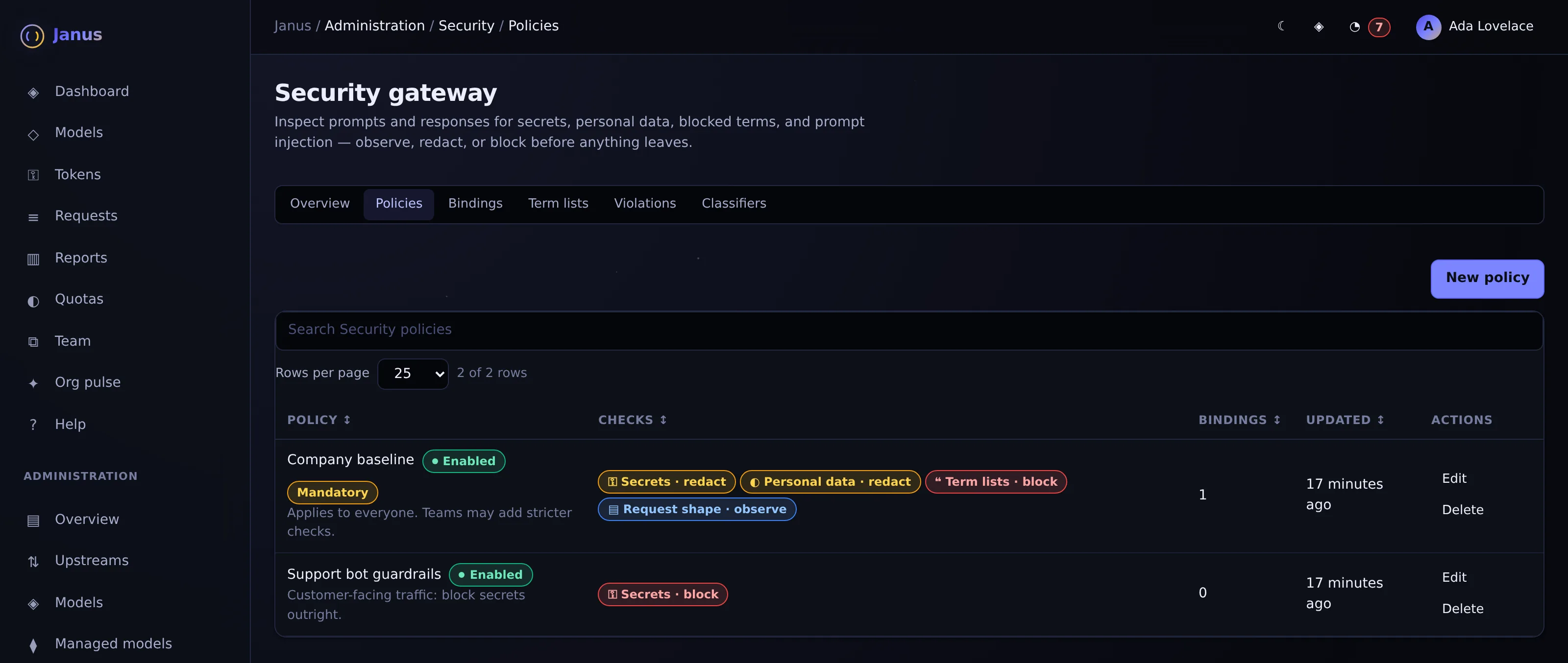
Policies stack. A mandatory company baseline redacts secrets and personal data and blocks codenames for everyone. A group policy for the support bot tightens secrets from redact to block. A team cannot relax the baseline: an attempt to switch secrets to observe-only is overridden by the floor. EVERYONE · MANDATORY FLOOR Company baseline Secrets: redact · Personal data: redact · Codenames: block SERVICE TOKEN · support-bot Tighten: secrets → block Allowed. Stricter than the floor. TEAM · Marketing Relax: secrets → observe only Overridden by the floor. Secrets stay redacted. Explain effective policy Pick any person and model to see each check as applied, skipped or held by the floor.

How it works

  • Later bindings override earlier ones except where a mandatory org check holds the floor
  • Explainer reports each check as applied, skipped or overridden by the floor
  • Dry-run endpoint evaluates sample text without sending traffic
In the product

Janus Security policies screen with demo data
Security policies

A mandatory company baseline that redacts secrets and personal data and blocks codenames, plus a stricter policy for a customer-facing bot.

Actual Janus interface · Demo identities and synthetic usage

See it on your own network.

The Community edition is free for up to 25 people. The 30-day Business trial unlocks every Business feature.