What Is an AI Gateway, and Why Companies Are Deploying One
An AI gateway puts one endpoint, one identity and one meter in front of every model your company uses. Here is what it does, what to check, and when to wait.
On this page
- How AI usage spreads inside a company
- Every provider speaks a slightly different language
- Keys end up everywhere
- Nobody knows who spent what
- Prompts carry data out of the building
- Shadow AI fills the gap
- What an AI gateway does about each problem
- One endpoint and one API
- Real identity on every request
- Per-model grants
- Metering against real rate cards
- Quotas and rate limits
- Guardrails on prompts and responses
- Logging and audit
- What to look for when evaluating one
- When you don’t need one yet
- How Janus Edge approaches it
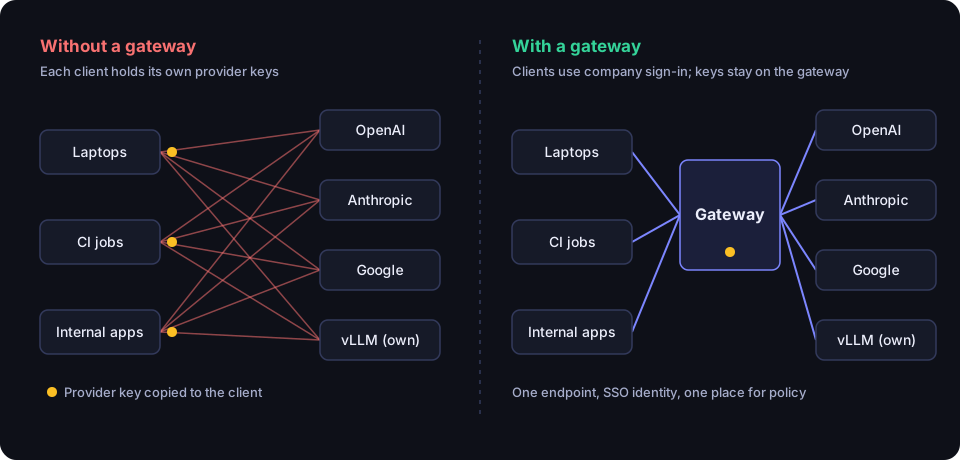
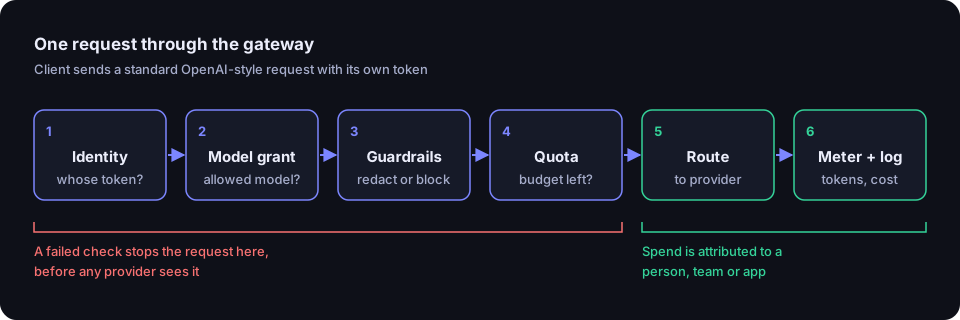
An AI gateway is a proxy that sits between the people and programs in your company and the language models they call. Instead of every laptop, script and internal app talking directly to OpenAI, Anthropic, Google or a GPU server in your own rack, they all talk to one endpoint you control. The gateway checks who is calling, decides whether they are allowed to use that model, forwards the request to the right provider, and records what it cost. It is plumbing, but it is the plumbing that decides whether your AI usage can be governed at all.
This guide walks through the problems that usually push a company toward a gateway, what a gateway actually does about each of them, a checklist for evaluating one, and an honest section on when you probably don’t need one yet.
How AI usage spreads inside a company
AI adoption rarely starts with a plan. A developer gets an OpenAI key to try something. The data team signs up for Anthropic because Claude handles their long documents better. Someone in marketing expenses a ChatGPT subscription. An infrastructure engineer stands up vLLM on a spare GPU box so the legal team can summarize contracts without sending them to a third party. Each decision is reasonable. A year later, nobody can fully describe the result.
Every provider speaks a slightly different language
OpenAI’s API became the de facto shape for chat requests, but it isn’t the only one. Anthropic’s Messages API structures system prompts, tool calls and streaming events differently. Google offers both the Gemini API and Vertex AI, with different authentication models. AWS Bedrock signs requests with IAM credentials. Azure OpenAI uses deployment names and its own endpoint scheme. Self-hosted servers like vLLM and Ollama mostly mimic the OpenAI format, though not always completely.
For a company this means every internal tool either gets locked to one provider’s SDK or carries its own translation layer that someone has to maintain. Switching a workload from one model to another becomes a code change instead of a configuration change.
Keys end up everywhere
Each provider needs a credential, and those credentials tend to travel. They get pasted into .env files on laptops, into CI secrets, into notebook cells, into a shared password-manager entry that half the department can see. When someone leaves the company, their access to your Active Directory is revoked the same afternoon, but the Anthropic key they copied into a side project six months ago keeps working until someone remembers to rotate it. Provider keys are also usually organization-wide: if one leaks, whoever holds it can spend against your account with no record of who they are.
Nobody knows who spent what
Model providers bill per token, and they price input tokens, output tokens and cached tokens differently. Prices also vary a great deal between models from the same vendor. The invoice tells you what the company spent with that provider last month. It does not tell you that most of it came from one batch job someone forgot to turn off, or that one team is using the most expensive model for tasks a cheaper one handles fine.
Without attribution you can’t set budgets, you can’t charge costs back to departments, and you can’t have a useful conversation about whether the spend is worth it. You also can’t stop a runaway job before the bill arrives.
Prompts carry data out of the building
Every prompt is data leaving your network. People paste stack traces that contain database passwords, customer emails with names and phone numbers, contract drafts with client names, and source code with hard-coded tokens. But your security team has no visibility into what was sent, and no way to strip a credential out before it reaches a third party.
There is also traffic coming the other way to think about. Applications that feed documents, web pages or emails into a model can be steered by instructions hidden in that content, which is what people mean by prompt injection. And when an auditor or incident responder asks who sent what to which model last Tuesday, “we’d have to ask the providers” isn’t a good answer.
Shadow AI fills the gap
If the sanctioned path to AI is slow or doesn’t exist, people find their own. They use personal ChatGPT accounts on work data, expense subscriptions, or install browser extensions and desktop tools that send content to services IT has never reviewed. Bans rarely work, because the tools are useful. The practical answer is to make the sanctioned route easier than the unsanctioned one, and to make it visible.
What an AI gateway does about each problem
A gateway doesn’t make these problems disappear, but it moves them to a single place where they can be handled once instead of in every tool.
One endpoint and one API
Clients point at the gateway’s URL instead of each provider’s. Most gateways expose an OpenAI-compatible API, because nearly every SDK and tool already supports it and changing the base URL is usually all it takes. The gateway translates to Anthropic, Bedrock, Vertex or whatever sits behind it. Moving a workload to a different model becomes a configuration change on the gateway, and if the gateway supports stable aliases (say chat-default), callers don’t even notice.
Real identity on every request
Instead of a shared provider key, each person signs in through your existing single sign-on and gets their own gateway token. Applications and CI jobs get named service credentials of their own. The provider keys live only on the gateway. When someone leaves, disabling them in your identity provider cuts off their AI access too, and a leaked gateway token can be revoked without rotating the provider key that every other user depends on.
Per-model grants
Not everyone needs every model. A gateway lets you say that the engineering group can use the expensive frontier model, everyone can use the general-purpose one, and only the legal team can reach the self-hosted model that is cleared for privileged documents. Ideally access starts at nothing and is granted explicitly.
Metering against real rate cards
Because every request passes through it, the gateway can record input, output and cached tokens per request and multiply them by the price that applies to that model. That gives you spend per person, per team, per application and per model, broken down however finance wants it. The figures should be close enough to the provider invoice that finance trusts them.
Quotas and rate limits
With attribution in place you can set limits: a monthly spend cap per team, a token budget per service account, a requests-per-minute ceiling so one script can’t starve everyone else. The runaway batch job hits its cap on day two instead of showing up on the invoice at the end of the month.
Guardrails on prompts and responses
A gateway can inspect prompts and responses on the way through. It can detect secrets and personal data, redact them before they leave, or block the request outright. It can run a classifier to flag prompt-injection attempts, and apply content-safety checks. Since the policy lives in one place, security can change it without asking every application team to ship an update.
Logging and audit
Every request leaves a record: who, which model, when, how many tokens, what it cost, whether a policy fired. Administrative changes such as new grants, new providers and policy edits leave an audit trail too. Whether full prompt and response bodies are stored should be a deliberate choice, because it has its own privacy trade-offs.
This is also the practical answer to shadow AI. If people can sign in with their company account and use good models from tools they already have, most will stop paying for personal subscriptions on the side.
What to look for when evaluating one
The category is crowded. There are open-source projects like LiteLLM, hosted services like Portkey, AI plugins for API gateways such as Kong AI Gateway, features inside the cloud providers themselves, and self-hosted commercial products. They differ more than their landing pages suggest. These are the questions we would ask of any of them, including ours.
- Where does it run, and where does your data go? Is it a hosted service that sees every prompt, or software you run on your own network? Can it run with no internet access at all if you need that?
- Does it work with the tools people already use? Check for an OpenAI-compatible endpoint and test it with the actual SDKs, IDE assistants and CLIs your teams run, including streaming and tool calls.
- Which providers does it support natively? Look past the logo wall. Ask how it handles Anthropic tool use, Bedrock authentication, Vertex service accounts and your own vLLM or Ollama servers.
- How does identity work? It should sign people in through your identity provider (OIDC, and LDAP or SCIM if you rely on them) rather than a separate user database. Check what happens to a person’s tokens when they are deprovisioned.
- Is access deny-by-default? Can you grant specific models to specific groups, and separate human tokens from service credentials?
- Does the metering match your invoices? Ask whether it tracks cached tokens and cache writes, whether prices are versioned so last quarter’s reports don’t change when a price does, and whether you can attribute spend to projects or cost centers.
- Are quotas enforced, or only reported? A dashboard that shows overspend after the fact is not a budget.
- Can guardrails redact and block, and do they cover streamed responses? Many products can detect a secret in a prompt; fewer can remove it before it leaves, or check a streamed answer before the bytes reach the client.
- What does it log, and can you turn bodies off? Find out where request and response content is stored, for how long, and who can read it.
- How does it behave under load and failure? Ask what the gateway adds to latency, whether it runs as multiple replicas, and what happens to requests when an upstream is down.
- How is it priced? Per seat, per request, or a percentage of model spend? A markup on tokens grows with your usage in a way per-seat pricing doesn’t.
- Can you read the code? For something that sits in the path of every prompt, source availability makes a security review much easier.
When you don’t need one yet
A gateway is one more service to run, upgrade and keep available, and it becomes a single point of failure for AI access. That cost is worth paying when you have the problems above. It isn’t always worth paying.
If you are a small team where a handful of people use one provider through its own business plan, the provider’s admin console may give you enough: SSO, a usage view, and a data-retention agreement. If the only AI use is a single internal application owned by one team, a secrets manager and the provider’s own usage dashboard may be all the governance you need for now. And if nobody has asked who spent what or what data is being sent, you may want to get the policy conversation going first, since a gateway enforces policy but doesn’t write it for you.
The signs that you’ve outgrown that stage are fairly consistent: more than one provider, keys you can’t account for, a bill nobody can explain, a security review that asks what is in the prompts, or a growing pile of AI subscriptions on expense reports. Once two or three of those are true, a gateway usually costs less effort than the workarounds.
How Janus Edge approaches it
Janus Edge is the gateway we build: a single self-hosted binary you run on your own server, VM or Kubernetes cluster, with the source published under the Elastic License 2.0. It exposes one OpenAI-compatible API and has native adapters for OpenAI-compatible APIs, Anthropic, Bedrock, Vertex AI, Gemini, Ollama, vLLM and llama.cpp, with protocol translation so Anthropic, Bedrock and Vertex models are reachable through the OpenAI chat API.
People sign in with OIDC single sign-on, and signing in grants nothing until an administrator adds explicit model grants. Applications get their own service tokens. Every request is metered against versioned rate cards that include cached-input and cache-write prices, and quotas can cap spend or tokens per person, team or token. Secret detection and PII detection run in the gateway itself, and the audit log records administrative actions and policy decisions. Metering never stores request or response bodies.
The Community edition is free for up to 25 active users on one gateway and includes metering, quotas and guardrails in observe mode. Redacting and blocking, SCIM and LDAP, and high availability are part of Business, which is priced per active seat; Enterprise adds air-gap support under an SLA. See pricing for details, download the Community edition, or start a 30-day trial of Business on your own hardware.