On-Premises vs Cloud AI Gateway: Trust Boundaries and Tradeoffs
Where prompts, provider keys and logs live in a SaaS AI gateway versus a self-hosted one, and a fair framework for deciding which model fits your organization.
On this page
- What actually flows through a gateway
- Where processing happens and where data rests
- Trust boundaries: who can see plaintext prompts
- Secrets: whose vault holds the provider keys
- Local models: don’t send local traffic on a round trip
- Data residency and compliance
- Latency
- Operational cost: the honest tradeoffs
- A decision framework
- How Janus Edge approaches it
An AI gateway sits between your people and the models they use. Every chat, every coding-assistant completion and every agent call passes through it, which makes it one of the most sensitive pieces of infrastructure you will run. Feature lists usually dominate the buying conversation, but the question that matters more for security and compliance is simpler. Where does the gateway run, and who can read what passes through it?
This guide walks through that question for the two common deployment models: a hosted (SaaS) gateway run by a vendor, and a gateway you run yourself on-premises or in your own cloud account. Both are legitimate choices. They draw the trust boundary in different places, and that has consequences for secrets, residency, latency and how much work lands on your team.
What actually flows through a gateway
Prompts. Full conversation history, system prompts, pasted source code, contract text, customer emails, stack traces with hostnames in them. Coding assistants send whole files of context with nearly every request.
Completions. The model’s answers, which often restate or transform the sensitive input. A summary of a confidential document is still confidential.
Files and images. Uploaded PDFs, screenshots and spreadsheets, usually base64-encoded inside the request body.
Provider API keys. To call OpenAI, Anthropic, Bedrock or Vertex on your behalf, the gateway holds the upstream credentials. These are the keys that bill your account and, for cloud platforms, may carry IAM permissions beyond inference.
User identity. Who sent the request, which group or team they belong to, often their email address and the IP they came from. This is what makes per-person budgets and audit trails possible.
Logs and metrics. Token counts, costs, latencies and status codes. Some products also log full request and response bodies, which turns the log store into a second copy of everything above.
A gateway that can enforce policy on prompts has to see them in plaintext. TLS protects the hop from the client to the gateway and the hop from the gateway to the provider, but the gateway itself terminates TLS and reads the body. That is the whole point of the component, and it is why its location matters.
Where processing happens and where data rests
In a SaaS gateway, your clients send requests to the vendor’s endpoint. The vendor’s infrastructure decrypts the request, applies routing and policy, attaches your provider key, and forwards the call. Metering data and any request logs are written to the vendor’s databases, in whichever regions they operate. Your admins configure everything through the vendor’s web console.
In a self-hosted gateway, the same steps happen on a server or cluster you control. Requests decrypt inside your network, provider keys live in your database or secret store, and logs land in storage you manage, under your retention rules.
Some vendors offer a split model: a hosted control plane with a data plane you deploy in your own network or VPC. This can be a good middle ground, but if the data plane ships request logs or prompt samples back to the hosted analytics service, the plaintext boundary has moved back out of your network.
Trust boundaries: who can see plaintext prompts
Drawing the boundary is the most useful exercise you can do before choosing. Take one prompt containing something you would not want leaked, say an unreleased product codename, and trace every system that holds it in readable form.
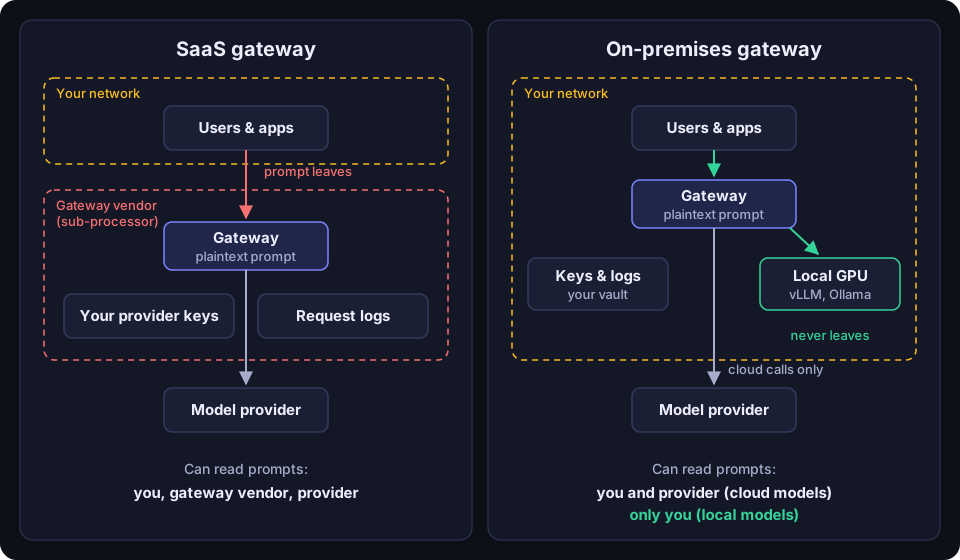
With a SaaS gateway sending to a cloud model, the codename is readable in three places: your endpoint, the gateway vendor, and the model provider. The gateway vendor is now a sub-processor of your data. Under GDPR and most enterprise contracts, that means a data processing agreement, an entry on your sub-processor list, a vendor security review, and a dependency on that vendor’s own sub-processors (their cloud host, logging and support tooling).
With a self-hosted gateway sending to the same cloud model, the codename is readable at your endpoint, on your gateway, and at the model provider. You have removed one party. The model provider still sees the prompt, and nothing about self-hosting changes that. Be wary of anyone who implies otherwise.
With a self-hosted gateway sending to a model you run yourself, the codename never leaves your network at all.
A gateway is also the natural place to catch sensitive data before it reaches a provider: detecting a pasted AWS key, a card number or a codename and redacting it. If that check runs inside a SaaS gateway, the sensitive value has already left your network by the time it is caught. The check still protects you from the model provider, but not from the gateway vendor. Running the check at your own edge means the value is caught before it crosses any external boundary.
Secrets: whose vault holds the provider keys
A hosted gateway needs your provider keys to do its job, so you hand them over. A well-run vendor encrypts them at rest and limits staff access, but the keys are still held by a third party, in a system you cannot audit directly. If the vendor has a breach, your keys are in scope, and some of them may be broad: a Bedrock or Vertex credential is a cloud IAM identity, not just an inference token.
Self-hosting keeps those credentials in your network, encrypted with a key you control. Rotation fits your existing process, cloud credentials can use workload identity or a role inside your own account instead of long-lived keys exported to someone else, and a breach at a gateway vendor cannot expose upstream accounts the vendor never had.
The flip side is that you are now responsible for protecting the database and encryption key the gateway uses. A self-hosted gateway on an unpatched VM with the key sitting next to the database is not safer than a well-run SaaS.
Local models: don’t send local traffic on a round trip
More organizations now run models on their own hardware with vLLM, Ollama or llama.cpp, often precisely because the data is too sensitive for an external provider. This is where the deployment model makes the biggest difference.
If your gateway is hosted, a request from a laptop in your office to a GPU server in the same building goes out to the vendor’s gateway and comes back in. That hairpin adds an internet round trip to every token stream, forces you to expose your inference server or build a tunnel for the vendor, and defeats the reason you ran the model locally: the prompt now passes through a third party on its way to a server down the hall.
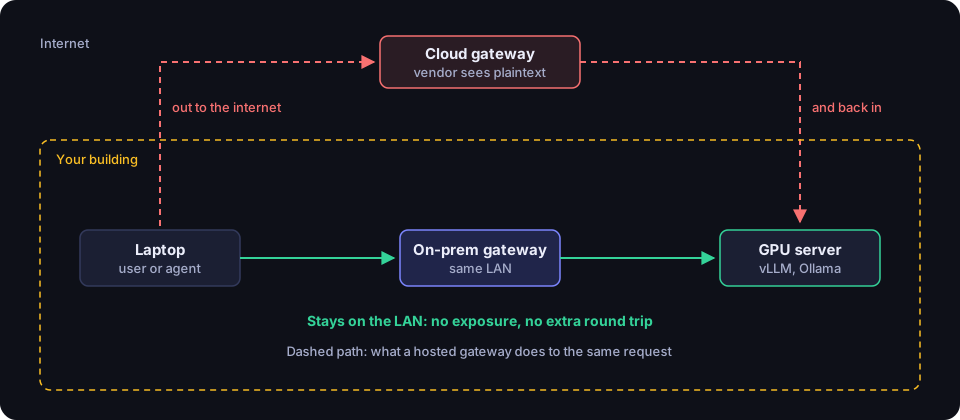
A self-hosted gateway on the same network sends local traffic straight to the local server. Prompts for local models never leave the building, while requests for cloud models still go out through the same gateway with the same identity, quotas and policies. For many organizations this mixed setup is the end state: sensitive work on local models, general work on frontier cloud models, one place to govern both.
Data residency and compliance
For regulated work, the question is not whether a SaaS gateway is secure but whether you can show an auditor where the data went. Every external party that processes prompts needs to be accounted for: a DPA, a place on your published sub-processor list, a region commitment, and evidence of their controls. Healthcare, financial services, legal and public-sector teams often have rules about which jurisdictions data may enter, and a gateway’s logging region counts.
Some environments rule out SaaS entirely. Classified and defense networks, many industrial control environments and some research labs are air-gapped or tightly egress-filtered. A gateway that needs to reach a vendor’s cloud, even just for license checks or telemetry, does not work there. If this is your situation, check that a self-hosted product can install from offline media, verify its license without calling home, and run indefinitely with no outbound connection.
Self-hosting does not make compliance automatic; you still set retention, restrict log access and document the flows. It does remove a party from the story, which makes that documentation easier to defend.
Latency
A hosted gateway adds a network leg between your client and the provider. When the vendor’s region is close to both, the extra time is small next to model inference. When it is far from your users or your provider, the cost shows up in time to first token, which is what people perceive as “slow.”
For local models the comparison is lopsided. A LAN hop measured in fractions of a millisecond against two internet crossings is not close. For cloud models the honest answer is that it depends on geography, and you should measure from your own sites before deciding either way.
Operational cost: the honest tradeoffs
This is where SaaS earns its place. With a hosted gateway, you sign up, paste in a key, change a base URL and you are running in an afternoon. The vendor handles uptime, scaling, database backups, upgrades and security patches. If your team is small and does not already run production services, that matters a great deal.
Self-hosting means you own all of that:
- Provisioning a VM or cluster, TLS certificates and DNS.
- Running and backing up the database.
- Applying upgrades and security releases on a schedule.
- Monitoring health, alerting on failure, and planning for high availability if the gateway becomes critical (and it will, once everyone’s coding assistant points at it).
For a team that already runs internal services, this is modest work: a gateway is a stateless proxy plus a database. The real question is whether you already have patching, monitoring and backup habits, or would be building them for this one service.
Pricing differs too. Hosted gateways often charge by request or log volume, which grows with adoption; self-hosted products tend to charge per seat or node, or are open source, with your infrastructure and staff time as the main cost. Work it out for your expected usage.
A decision framework
A SaaS gateway is a reasonable fit if you are a small or mid-sized team with no ops capacity to spare, your AI usage is cloud models only, your data is not regulated or contractually restricted, and you are comfortable adding a sub-processor.
A self-hosted gateway is the better fit if you run or plan to run local models, if prompts routinely contain source code, customer data or regulated information, if your contracts or regulators limit sub-processors or regions, if you must operate air-gapped or behind strict egress controls, or if you want provider keys to stay in your own vault.
A hybrid can make sense when different parts of the organization have different needs. One common shape is a self-hosted gateway at each site that fronts local GPUs and also routes to cloud providers, so local traffic stays local and cloud traffic is governed in one place. Another is a vendor’s split model, once you confirm no prompt content flows back to the hosted side.
| Question | Leans SaaS | Leans self-hosted |
|---|---|---|
| Who can read plaintext prompts? | Acceptable to add the gateway vendor | Must stay within your network and the model provider |
| Local models (vLLM, Ollama)? | None planned | Running or planned |
| Provider keys | Fine with a third party holding them | Must stay in your vault |
| Regulation and contracts | Light | Sub-processor or region limits, air-gap |
| Ops capacity | Little or none | Already run internal services |
How Janus Edge approaches it
Janus Edge is a self-hosted gateway, so it sits on the right-hand side of the diagrams above by design. It ships as a single binary, container image and Helm chart, runs on SQLite for a single server or PostgreSQL for production, and fronts both cloud providers and your own vLLM, Ollama or llama.cpp servers behind one OpenAI-compatible endpoint. Upstream credentials are encrypted at rest. Metering records tokens, cost and latency without storing request or response bodies; full bodies are only kept if an administrator opens a time-limited troubleshooting capture (a Business feature).
Secret and PII detection run inside the gateway with no external service, so a pasted key is caught before it leaves your network. Detection is in every edition; redacting or blocking requires Business. For sites that cannot call out, every edition installs and verifies its license offline, and update checks and license sync are off by default. If the gateway only fronts your own GPUs, local-only mode hides prices and keeps metering tokens and speed. High availability with several replicas against one PostgreSQL database is a Business feature. And because it is the component that sees all your AI traffic, the source is available for you to audit.
The trade is the one described above: you run it. Community is free for up to 25 active users on one gateway, Business is priced per active seat, and Enterprise starts at $25k per year; details are on the pricing page. You can download it or start a trial, and our security practices are described on the security page.
Whichever way you go, draw the trust boundary for your own traffic first. Once you know who can read a prompt and who holds the keys, the rest of the decision usually follows.