Enterprise AI Adoption: An IT Guide to Enabling, Not Blocking
How IT teams can provide AI to the whole workforce: frontier and local models, the tools people use, personal tokens, chargeback and a phased rollout plan.
On this page
- From “should we allow it” to “how do we provide it well”
- Offer both frontier and local models
- Know the harnesses people actually use
- Chat interfaces for everyone
- Coding agents and IDE assistants
- Personal subscriptions versus API usage
- Applications running inside the network
- Should users get their own API keys?
- Teams, cost centers and chargeback
- A phased rollout plan
- Training and acceptable-use policy
- How to say yes safely
- How Janus Edge approaches this
Most IT teams first met generative AI as a policy problem. Someone pasted a customer email into a chatbot, legal asked what the rules were, and the fastest answer was a block on the firewall. That made sense for a few months. It makes less sense now, because the people you blocked did not stop using AI. They moved to their phones, to personal accounts, and to browser extensions you have never heard of. The work still happens, just somewhere you can’t see it.
This guide is for the IT director or platform lead who wants to move past that stage. It covers which models to offer, which tools people actually use, how to hand out credentials without losing track of them, how to split the bill, and how to roll all of it out in phases with numbers you can report on. Most of it applies whatever product you choose.
From “should we allow it” to “how do we provide it well”
Blocking assumes that the risk comes from the tool. In practice most of the risk comes from the path the data takes: which provider receives it, under which contract, with whose credentials, and whether anyone can reconstruct what happened afterward. A sanctioned path with good defaults is safer than an unsanctioned one with no visibility, even if the underlying model is the same.
So the useful question becomes a service-design question. What should a person in finance, a developer, and an internal application each be able to reach on day one? What is the default model, what requires approval, and what never leaves the building? Once you frame it this way, AI looks like any other shared service IT already runs, such as email, VPN or source control. You pick providers, you integrate identity, you meter usage, and you publish an acceptable-use policy. None of that is exotic.
Offer both frontier and local models
The large hosted providers (OpenAI, Anthropic, Google, and their cloud equivalents on AWS Bedrock and Vertex AI) give you the most capable models with no hardware to run. For drafting, analysis, coding help on non-sensitive code and general research, they are usually the right default. Use business or API terms rather than consumer accounts, and read the data-retention terms for each.
Self-hosted models fill a different role. An open-weight model served with vLLM, Ollama or llama.cpp on your own GPUs never sends a prompt outside your network. That matters for work involving regulated data, unreleased source code, HR cases, or anything a contract says must stay on-premises. Local models are also predictable in cost once the hardware is paid for, which makes them a good fit for high-volume automated jobs like classifying tickets or summarizing logs.
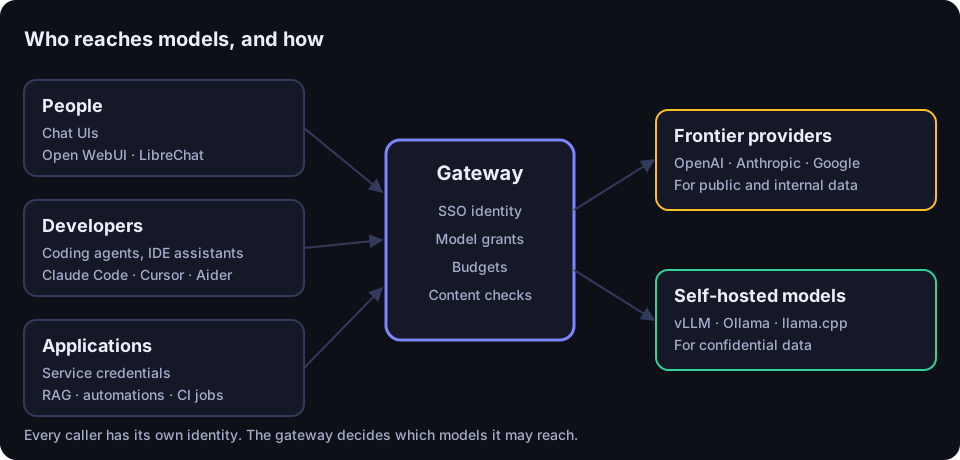
The practical pattern is to route by sensitivity rather than to pick one camp. A reasonable starting rule might be: public and internal data can go to approved frontier models; confidential and regulated data goes only to self-hosted models; anything in between is decided per team. You enforce that rule with model access grants, so the HR team simply has no frontier model available in its context, and with content checks that catch secrets or personal data before a request leaves the network. Stable model names help too. If people and apps call chat-default or secure-local instead of a specific vendor model id, you can change what sits behind those names without touching anyone’s setup.
Know the harnesses people actually use
“AI adoption” sounds like one thing, but people reach models through very different tools. We’ll call these tools harnesses: the software that wraps a model and puts it in front of a person or a process. Each one has its own way of authenticating, and your plan has to account for all of them.
Chat interfaces for everyone
Most employees want a chat window. Self-hosted interfaces like Open WebUI and LibreChat give them one that runs inside your network, signs in through your identity provider, and talks to whatever model backend you configure. They support uploading documents, saving conversations and switching models. For the bulk of your staff, a well-configured chat UI pointed at a governed endpoint covers most of what they were using consumer chatbots for.
Coding agents and IDE assistants
Developers are a different population with different tools. Terminal agents such as Claude Code, Codex CLI and Aider read and edit files across a repository. IDE assistants such as Cursor, Continue and GitHub Copilot work inside the editor. These tools make many more requests than a person typing into a chat window, often with large contexts, so they dominate token spend in most organizations that track it.
They also differ in what they can connect to. Some accept any OpenAI-compatible base URL and key, which makes them easy to point at your own gateway. Others expect a specific vendor’s API format or a vendor sign-in, so check each tool’s configuration options before you promise developers that everything will route through one endpoint. Publish a short, tested connection recipe for every tool you support. A developer who has a working config in two minutes will not go looking for a workaround.
Personal subscriptions versus API usage
Many people already pay for, or expense, a ChatGPT or Copilot plan. Those subscriptions bill a flat monthly price per person, while API usage bills per token. Both have a place. A flat subscription can be cheaper for a heavy interactive user; API access is better for automation, for models the subscription doesn’t include, and for anything you need to meter and attribute. The governance problem with subscriptions is that the traffic usually goes straight from the person’s machine to the vendor, outside any controls you run. If you allow them, decide whether you want that traffic to pass through your own checks, and say so in your policy.
Applications running inside the network
The third group isn’t people at all. Internal apps, retrieval-augmented search over your document stores, ticket triage bots, CI jobs and workflow tools like n8n all call models on a schedule or in response to events. These need service credentials: a named key that belongs to the application, has its own permissions and limits, and keeps working after the engineer who set it up changes roles. The single most common mistake here is wiring a production automation to one employee’s personal key. When that person leaves, either the automation breaks or, worse, it keeps running on a credential nobody owns.
Should users get their own API keys?
Yes, but not raw provider keys. Handing a developer an OpenAI or Anthropic key directly has three problems. The key carries whatever access the provider account has, so you can’t limit it to particular models. Its usage shows up on one shared invoice with no reliable way to attribute it. And revoking it usually means rotating a key that other people or systems also depend on.
The better pattern is a personal token issued by your own gateway. The person signs in with SSO and creates a token in a self-service portal. That token is tied to their identity, can only reach the models they have been granted, counts against their budget, and can be revoked on its own without affecting anyone else. When the person leaves and the directory disables their account, their tokens stop working with it. The upstream provider keys stay with IT, stored once in the gateway, and no employee ever sees them.
Teams, cost centers and chargeback
Once every request is tied to a person or a service, the bill becomes something you can explain. Group people into teams that match how your finance department thinks, usually departments or cost centers, and give each team its own model grants and budget. A team context also answers a common edge case: a developer who works on two projects can use a token bound to each team, so their usage lands on the right budget.
Some spend doesn’t map neatly to a team. A shared platform service might be used by several business units, or a project might be funded separately from the department that runs it. For those cases it helps if applications can tag requests with a project or cost-center label, which then shows up in reports. Treat those labels as reporting data, not as access control, since the client sets them.
Start with showback before chargeback. For the first quarter, send each department lead a report of what their team used and what it cost, with no money moving. That builds trust in the numbers and surfaces mistakes in team assignment before anyone’s budget depends on them.
A phased rollout plan
Rolling AI out to an entire company at once is how you end up with a support queue full of “my key doesn’t work” tickets and no idea which of them matter. A phased plan lets you fix the defaults while the group is small.
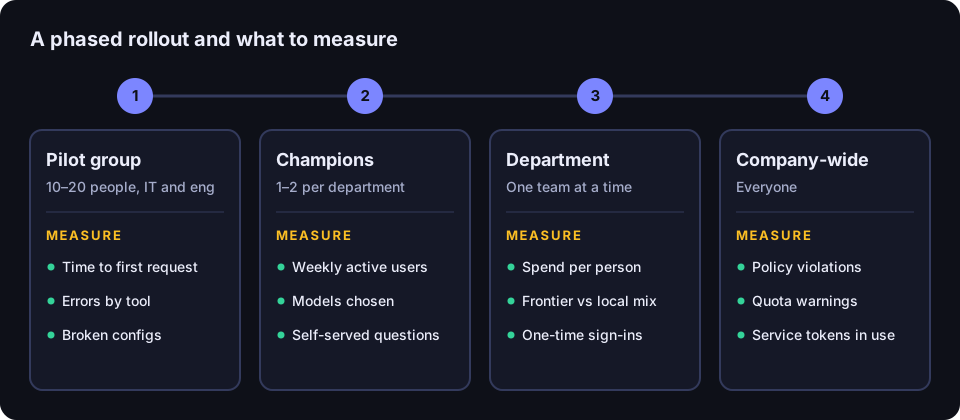
- Pilot group (a few weeks). Pick ten to twenty people from IT and engineering who are comfortable reporting problems. Give them a chat UI, one or two coding tools, a frontier model and a local model. Measure how long it takes to go from sign-in to a first successful request, which errors come up, and which tool configurations break.
- Champions (a month or so). Recruit one or two volunteers from each department who already use AI. They test the connection recipes on real work, write short examples for their colleagues, and become the first line of support. Measure weekly active users, which models they pick, and how many questions they could answer without IT.
- Department rollout. Open access one department at a time, with team grants and a budget in place before the first person signs in. Measure spend per active person, the split between frontier and local models, and how many people signed in once and never came back.
- Company-wide. By now the defaults are tested, the recipes are written, and the reports exist. Measure the same numbers across the whole organization, plus blocked policy violations, quota warnings and the number of service credentials in use.
Two measurements deserve special attention throughout. Blocked or flagged violations tell you whether your content rules are calibrated: a rule that fires constantly is probably catching legitimate work, and a rule that never fires may not be checking anything useful. Idle users tell you where training is missing. Someone who has access and does not use it usually doesn’t know what to use it for.
Training and acceptable-use policy
An acceptable-use policy for AI does not need to be long. The useful ones fit on a page and answer specific questions: which tools are approved, which data classes may go to which models, what to do if you pasted something you shouldn’t have, who owns automated workflows, and whether personal subscriptions are allowed for work. Write it in the same terms as your existing data classification policy so people don’t have to learn a second vocabulary.
Training works best when it is tied to the job. A thirty-minute session for finance on summarizing contracts with the local model will do more than a general lecture on prompt engineering. Ask your champions to run these sessions; they know which tasks their colleagues actually do.
How to say yes safely
Saying yes is mostly a matter of putting a few controls in the path and then getting out of the way. Here is a checklist that covers the essentials:
- Every human signs in through SSO, and access ends when the directory says it ends.
- Nobody has access to a model until it is granted to them, their group or their team.
- People get personal tokens from a self-service portal; nobody gets a raw provider key.
- Applications get named service credentials with their own grants and limits.
- Sensitive work is routed to self-hosted models by grant, not by asking people to remember.
- Secrets and personal data are detected at the gateway before requests leave the network.
- Every request is metered and attributed to a person, team or service.
- Budgets and quotas exist before access opens, with warnings before the hard limit.
- Each supported tool has a tested connection recipe.
How Janus Edge approaches this
Janus Edge is a self-hosted AI gateway built around the model described above. People sign in through your OIDC provider (SSO), and signing in grants nothing until you add model grants for a person, group, team or service token. Users create their own personal API tokens in the portal, bound to themselves or one of their teams, and applications get service tokens that can call models but cannot open the dashboards. With SCIM provisioning on the Business edition, deprovisioning a person revokes their keys and sessions at once.
The gateway exposes an OpenAI-compatible API, so tools that accept a custom base URL and key can use it, and it puts hosted providers like OpenAI, Anthropic, Bedrock, Vertex and Gemini next to self-hosted vLLM, Ollama and llama.cpp servers behind one catalog. Model aliases give people a stable name to call while you change the model behind it. People who already pay for a ChatGPT, Copilot, Grok or Mistral plan can connect it as a personal subscription, so that traffic can be covered by your security policies. Teams, quotas and project and cost-center tags cover budgets and chargeback, and the in-app help includes copy-ready connection snippets. If you only run your own GPUs, local-only mode turns off cost tracking and keeps token metering.
The Community edition is free for up to 25 active users on one gateway, which is enough for a pilot group and your first champions. Business adds directory sync, guardrail enforcement and high availability, priced per active seat; service tokens don’t count as seats. See pricing for details, or download it and run your pilot on a single server.