Migrating from Portkey to Janus Edge: An Honest Guide
Thinking of leaving Portkey? A fair look at Portkey and Janus Edge, a step-by-step migration plan, and the cases where Portkey is still the better call.
On this page
- Quick verdict
- Stay on Portkey if
- Consider Janus Edge if
- What changed at Portkey in 2026
- Portkey and Janus Edge side by side
- Hosting and license
- Identity, budgets and pricing
- Guardrails and logging
- Classification on live traffic
- Request classification for security
- Content classification with your own categories
- Auto-routing by kind of work and difficulty
- Child Safety
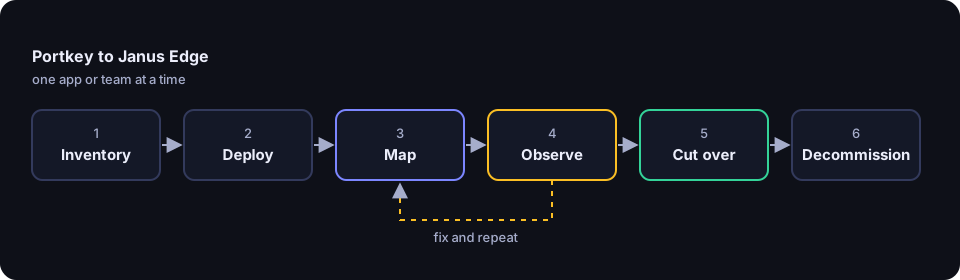
- Migration, step by step
- 1. Inventory what Portkey does for you
- 2. Deploy Janus Edge
- 3. Map providers, keys and access
- 4. Map configs, routing and fallbacks
- 5. Map guardrails
- 6. Switch base URLs in your SDKs
- 7. Run both gateways in parallel
- 8. Cut over
- 9. Decommission Portkey
- When Portkey is still the better fit
- Sources
Portkey and Janus Edge both sit between your applications and the models they call, and both speak the OpenAI API. That is what makes a move practical: most client code changes by a base URL, a key and a model name. The harder part is everything around the request, such as routing configs, guardrails, budgets and logs. This guide covers that part.
We make Janus Edge, so we have tied every Portkey statement to Portkey’s own pricing page, documentation or repository, listed at the end and last reviewed on October 16, 2026. If something has gone out of date, tell us and we will correct it.
Quick verdict
Many teams on Portkey should stay there. A move makes sense when your needs have shifted from developer tooling toward governing AI use across a whole organization, on your own network.
Stay on Portkey if
- You want a hosted service, or a hybrid setup where the vendor runs the control plane for you.
- Your apps depend on response caching, prompt templates, conditional routing on request metadata, or partner guardrail vendors.
- You are standardizing on Palo Alto Networks’ Prisma AIRS platform anyway.
Consider Janus Edge if
- Everything, including the admin console, logs and configuration, has to run on infrastructure you control.
- Everyone in the company, not only developers, should sign in with single sign-on and get models by explicit grant.
- You would rather pay per active person than per log volume, and keep prompt bodies out of storage by default.
What changed at Portkey in 2026
Palo Alto Networks announced on May 29, 2026 that it had closed its acquisition of Portkey and that Portkey would become the AI gateway for its Prisma AIRS security platform. Portkey’s pricing page now says “Portkey is now PRISMA AIRS AI Gateway,” and its documentation is published under that name. The newer setup guide starts in Palo Alto’s Strata Cloud Manager and uses https://aigw.portkey.ai/v1 as the gateway URL, while many existing pages and SDK examples still use https://api.portkey.ai/v1.
None of that is a reason to migrate on its own, and acquisitions often bring more resources and tighter security integration. It is a good moment to check your contract terms and renewal date, ask your account team what changes for your plan, and then decide on the merits of the product.
Portkey and Janus Edge side by side
For Portkey, “Developer”, “Production” and “Enterprise” are its plan names, and “OSS” is the MIT-licensed gateway on GitHub. For Janus Edge, “every edition” includes the free Community edition.
| Capability | Portkey | Janus Edge |
|---|---|---|
| Hosting | Hosted SaaS; hybrid on Enterprise (gateway in your VPC, vendor-run control plane); self-hosted OSS gateway | Self-hosted only: binary, container or Helm chart |
| License | Gateway is MIT; platform is commercial | Source available under ELv2 |
| Free use | Developer plan, 10K logs a month, 3-day log retention; OSS gateway | Community: 25 active people, one node, for organizations under 100 people and $10M revenue |
| Paid model | Production $49 a month for 100K logs, then $9 per 100K up to 3M; Enterprise custom | Per active seat; Enterprise from $25,000 a year |
| Single sign-on | OIDC or SAML 2.0 on Enterprise; SCIM documented | One OIDC provider in every edition; SCIM, LDAP and more providers on Business |
| Budgets and limits | Per-key, workspace and integration budgets: Enterprise and select Pro customers | Quotas and rate limits per person, team or service token, every edition |
| Guardrails | Deterministic checks free; LLM and partner checks on Production; custom on Enterprise | Secrets, PII, codenames, injection and safety checks; observe in every edition, redact and block on Business |
| Logging | Full request and response logs by default, with a metrics-only mode | Metering without bodies; time-limited captures on Business; Janus Chat keeps each person’s chats encrypted |
| Observability | Logs, traces, analytics, feedback, OpenTelemetry export | Prometheus, OTLP traces, JSON logs, dashboards, reports |
| Routing | Fallback, weighted load balancing, conditional routing, retries, caching | Aliases and classifier-based auto-routing in every edition; fallback and pools on Business |
Hosting and license
Portkey comes in three shapes. The hosted service is the default. Enterprise adds a hybrid deployment: the gateway and its cache run in your cloud, while the dashboard, configuration and analytics live in a management plane the vendor runs, synced over outbound HTTPS about once a minute. The MIT-licensed open source gateway runs with npx or Docker and includes routing, guardrails and a local console, but not the hosted dashboard or org administration.
Janus Edge only runs on your infrastructure. The gateway and admin console ship as one Linux binary, container image and Helm chart (single binary, Docker, Compose and Helm), on SQLite or PostgreSQL with no Redis (SQLite or PostgreSQL). The source is published under the Elastic License 2.0 (source available), which lets you read, audit and build it but is not an OSI open source license. There is no hosted Janus, which is a real limitation if you want one.
Identity, budgets and pricing
On Portkey, single sign-on is an Enterprise feature, with OIDC or SAML 2.0, and the docs also cover SCIM provisioning. Budget and rate limits on API keys are documented for Enterprise and select Pro customers; budgets can also sit on workspaces and provider integrations, with alert thresholds and weekly or monthly resets. Self-serve pricing follows log volume, not people.
On Janus Edge, people sign in through your OIDC provider in every edition (single sign-on), and signing in grants nothing until an administrator grants a model to a person, group, team or service token (model grants). Quotas cap tokens, spend or requests, and rate limits hold across replicas. Janus has no SAML, which matters if your identity provider only speaks SAML. Business is priced per active seat (see pricing): anyone who signed in during the last 30 days. Service tokens don’t count.
Guardrails and logging
Portkey’s guardrails run on input or output, synchronously or asynchronously. A failed check can deny the request with status 446, or pass it with status 246 so your code or a fallback can react. There are more than 20 deterministic checks, such as regex and JSON schema, plus LLM-based checks and partner integrations. Portkey evaluates only the last message, and output checks on streams run after the stream ends and are informational only.
Janus Edge bundles checks into a security policy bound to the organization, a group, a service token, an upstream, a model or an alias: 27 secret detection rules, PII detection, term lists, injection and safety classifiers, and stream scanning of answers as they arrive. It has no JSON-schema validation or partner guardrail vendors.
Logging differs most. Portkey’s logs show the full request and response; you can switch to Metrics Only mode or skip bodies per request with the x-portkey-debug: false header. Janus metering never stores bodies; to see a failing request in full, an administrator starts a time-limited troubleshooting capture, which needs Business. Prometheus, OTLP traces and JSON logs come with every edition.
Classification on live traffic
Request classification for security
Prompt-injection detection runs Llama Prompt Guard 2 or another classifier served by Hugging Face TEI, or a decision model such as TypeSafe Jev or Bespoke Nimble, on incoming requests. Content safety checks what people send and what models answer against named categories: a decision model reads plain-language descriptions of 14 Safety categories based on the S1 to S14 hazard taxonomy and any you write yourself, and Llama Guard on your own vLLM remains available as a Llama Guard compatible method. Both observe in every edition and block on Business. A self-hosted classifier keeps the prompts on your hardware; a hosted one receives them. Security guards judge each new message on its own.
Content classification with your own categories
This answers a question most gateways leave open: what are people using AI for? Janus’s usage insights label each sampled chat request with a category from a set you control. There are 22 built-in categories, such as Coding, Legal, and Writing and editing, and you can add your own, with one level of subcategories, for example Rust under Coding. Reports show categories over time and the models, people and teams behind each one, along with the classifier’s own latency, failures and cost. Janus stores only the label, its confidence and the timing, never the prompt, and deletes results after a retention period you set.
The classifier can be a small decision model or any chat model Janus can reach; a self-hosted one keeps prompts on your network, a hosted one receives them. Labeling runs in the background by default and adds no latency. Inline mode labels the request before forwarding it and returns an X-Janus-Category response header, waiting no longer than your timeout. A classifier failure never fails the request.
Auto-routing by kind of work and difficulty
Tiering means sending routine work to a cheaper model and harder work to a stronger one. Janus does this per request with auto-routing, included in every edition. A router is a model name callers use, such as auto/smart or auto/legal. For each request a decision model answers which routing category the work falls into and, when a route needs it, how difficult it is on a 1 to 5 scale. The router sends the request to the first route that fits, matching on category, difficulty band, context fit, grant and quota, and to its default model otherwise.
There are 15 built-in routing categories, each with what it includes and does not include, a minimum confidence and test examples, or a route can follow a usage insights category. Templates cover common setups: Cost saver, Keep specialist work on-prem, Effort scaler and Coding by difficulty. A route can also set thinking as requested, at a fixed level or scaled with difficulty. A follow-up message is classified with the recent conversation as context, so a short “keep going” is routed by the task it belongs to. Conversations stay on their route for 30 minutes by default. Routing never fails a request: an unsure, slow or failed classifier, or no fitting route, serves the default. Routers are managed models, so you grant them, bind security policies to them and cover them with quotas. A route that targets a pool or a fallback alias needs Business for that alias.
You can run a router in Shadow first, where the default serves every request and Janus records what the router would have done. Route evaluation then has a sample of a route’s requests answered by the default as well, and a judge model compares the two answers blind, twice with the order swapped, reporting results and cost against the default without storing prompts or answers. Router instructions let a router, each route and the default add their own text to the system prompt, so a route can change the kind of answer as well as the model. The request log shows which model served and why, and optional X-Janus-Route headers tell the caller.
Child Safety
The same decision models support AI for children. Child Safety, which replaced the earlier Family router and Parental controls policy templates in Janus Edge 2026.10.5, attaches rules to each child, or a team of children, with an age range: Little kids, Kids, Teens or your own copy. The rules follow the child to every model they can use, in Janus Chat and through the API. Six categories (feeling low or unsafe, not suitable for children, getting around parental controls, sharing personal information, homework done for them, and homework learning) are each set to off, answer appropriately or block. A tutor rule never gives the final answer, a child who is feeling low is pointed to a trusted adult and the 988 Suicide & Crisis Lifeline, and the critical safety categories always block in both directions. Child Safety, blocking included, works in every edition. Portkey has no equivalent template, though its guardrails can be configured for similar checks.
Migration, step by step
1. Inventory what Portkey does for you
List every app that calls Portkey, with its API key, providers, models and config. A config can be attached to an API key as a default, so it may not appear in the app’s code. Export configs, guardrails (including workspace and organization-level ones), budgets and rate limits. Virtual keys have moved to Portkey’s Model Catalog, where models are named @provider-slug/model-name; record both forms. Then mark each feature must-have, nice-to-have or unused. Caching, prompt templates, conditional routing and the MCP gateway are the most likely to have no Janus equivalent, so find them first.
2. Deploy Janus Edge
Install Janus on a Linux server, in a container or with the Helm chart (install guide). Use PostgreSQL if this will become production, and connect your OIDC provider. Community covers a 25-person pilot if your organization is eligible; otherwise, the 30-day Business trial also lets you test fallback, enforcement and captures.
3. Map providers, keys and access
Each Portkey integration or virtual key becomes a Janus upstream for the same provider, with credentials encrypted at rest (providers). Workspaces and model allow-lists become teams and model grants. Human callers get personal API tokens, and pipelines and agents get service tokens, so no integration borrows a person’s key. Portkey budgets become quotas, and rate limits become per-person or per-token rate limits. If you send Portkey metadata for chargeback, the closest match is the X-Janus-Project and X-Janus-Cost-Center headers (attribution).
4. Map configs, routing and fallbacks
A Portkey fallback config maps to an alias with a fallback model, on Business; Janus switches when the target is disabled, its upstream fails a probe or recent requests keep failing, and says why in a response header. Weighted load balancing maps to load-balanced pools, built for several servers running the same model, such as vLLM or llama.cpp. Test carefully if you balance across cloud accounts today.
Some things do not map. Janus never retries generative calls, so a retry can never turn into a second charge; if you relied on Portkey retries, turn on retries in your SDK and watch for duplicates. Janus has no response cache and no conditional routing on metadata or parameters. If your Portkey conditions pick a model by the kind of request, an auto-router can make that choice from the request text instead. If they key on metadata, the usual replacement is one alias per route, with the app or the grant deciding which alias a caller uses.
5. Map guardrails
Map each Portkey guardrail to a Janus check: PII to PII detection, keyword lists to term lists, injection checks to the injection classifier, moderation to content safety. Find code that looks for Portkey’s 246 or 446 status codes; Janus returns its own policy errors with a reason.
6. Switch base URLs in your SDKs
If an app uses the OpenAI SDK against Portkey, the change is small. Before:
from openai import OpenAI

client = OpenAI(
    api_key=PORTKEY_API_KEY,
    base_url="https://api.portkey.ai/v1",
    default_headers={"x-portkey-config": "pc-example"},
)
reply = client.chat.completions.create(model="@openai-prod/gpt-4o", messages=messages)
After:
from openai import OpenAI

client = OpenAI(
    api_key=JANUS_TOKEN,                 # a Janus personal or service token
    base_url="https://ai.example.com/v1",  # your Janus gateway
)
reply = client.chat.completions.create(model="chat-default", messages=messages)
Remove every x-portkey-* header and replace @provider/model names with Janus model names or aliases; GET /v1/models lists exactly what each token may call (OpenAI-compatible API). Apps built on Portkey’s own SDK should move to the standard OpenAI SDK. Anthropic and Bedrock models are served through the same OpenAI chat API (protocol translation).
7. Run both gateways in parallel
Janus does not mirror traffic, so “parallel” means moving one app or team at a time while the rest stays on Portkey. Start with an internal tool. For each move, compare tokens and cost in the Janus request log with Portkey’s logs, check latency, and read the observe-mode violations. If something disagrees, fix the mapping and repeat.
8. Cut over
When the numbers match and false positives are tuned, switch on enforcement where you need it and move the remaining apps. Keep the Portkey keys valid for a short rollback window. Repointing an alias later is one admin change, so model choices don’t need to be perfect yet.
9. Decommission Portkey
Once traffic on the old keys stops, export any Portkey logs you must retain, revoke the Portkey API keys, remove provider credentials from Portkey and rotate them. Then remove the old SDKs and environment variables from code and CI.
When Portkey is still the better fit
Portkey is the better choice if you want someone else to run the gateway; its hosted service and hybrid control plane remove database and upgrade work that Janus leaves to you. It is also ahead on developer features: simple and semantic caching, versioned prompt templates, conditional routing, nested strategies, and MCP and agent gateways. If your team uses those daily, you would be giving them up.
Breadth is the other reason. Portkey connects to partner guardrail vendors and custom guardrail webhooks, and Prisma AIRS will suit organizations already running Palo Alto Networks tools. Small teams that don’t need SSO may also find the $49 Production plan cheaper than per-seat pricing.
Janus Edge is the better fit when identity, attribution and keeping data on your network come first. Sign-on works in every edition, access starts closed, prompts are not stored by default, and the free edition can observe every check before you pay to enforce it.
Sources
Portkey sources, all accessed October 16, 2026:
- Portkey pricing: https://portkey.ai/pricing
- Palo Alto Networks, acquisition completed (May 29, 2026): https://www.paloaltonetworks.com/company/press/2026/palo-alto-networks-completes-acquisition-of-portkey-to-secure-ai-agents
- Open source gateway, README and MIT license: https://github.com/Portkey-AI/gateway
- Simple setup (Strata Cloud Manager, gateway URL): https://docs.portkey.ai/docs/aigw/introduction/simple-setup
- Hybrid deployment architecture: https://docs.portkey.ai/docs/aigw/self-hosting/hybrid-deployments/architecture
- Enterprise architecture (data plane and control plane sync): https://portkey.ai/docs/product/enterprise-offering/private-cloud-deployments
- SSO: https://docs.portkey.ai/docs/aigw/product/enterprise-offering/org-management/sso
- SCIM: https://docs.portkey.ai/docs/aigw/product/enterprise-offering/org-management/scim/scim
- Budget and rate limits on API keys: https://docs.portkey.ai/docs/aigw/product/administration/enforce-budget-and-rate-limit
- Budget limits on integrations: https://docs.portkey.ai/docs/aigw/product/policies/budget-limits
- Guardrails: https://docs.portkey.ai/docs/aigw/product/guardrails
- Configs and default configs on API keys: https://docs.portkey.ai/docs/aigw/product/ai-gateway/configs
- Conditional routing: https://docs.portkey.ai/docs/aigw/product/ai-gateway/conditional-routing
- Fallbacks: https://docs.portkey.ai/docs/aigw/product/ai-gateway/fallbacks
- Load balancing: https://docs.portkey.ai/docs/aigw/product/ai-gateway/load-balancing
- Caching: https://docs.portkey.ai/docs/aigw/product/ai-gateway/cache-simple-and-semantic
- Virtual Keys moved to Model Catalog: https://docs.portkey.ai/docs/aigw/product/ai-gateway/virtual-keys
- Logs and DO NOT TRACK: https://docs.portkey.ai/docs/aigw/product/observability/logs
- Request logging modes: https://docs.portkey.ai/docs/aigw/product/administration/configuring-request-logging
Janus Edge facts come from our feature pages, pricing and install guide.
Portkey and Prisma AIRS are trademarks of their respective owners. This page is not affiliated with or endorsed by Portkey or Palo Alto Networks.