Janus Edge vs LiteLLM: Comparing Two Self-Hosted AI Gateways
A fair look at Janus Edge and LiteLLM: licensing, sign-on, budgets, guardrails, classifiers and routing, with sources, so you can pick the gateway that fits.
On this page
- Quick verdict
- Choose LiteLLM if
- Choose Janus Edge if
- At a glance
- Licensing and what you pay for
- Identity and access
- Cost tracking, budgets and limits
- Guardrails in the request path
- Classifiers on live traffic
- Janus Edge: usage insights and decision-model guards
- Janus Edge: auto-routing
- LiteLLM: Auto Routing
- Routing, reliability and caching
- Where LiteLLM is the better fit
- Where Janus Edge is the better fit
- Sources
LiteLLM and Janus Edge both sit between your applications and the language models they call. Both run on infrastructure you control, and both accept requests in the OpenAI API format. The overlap mostly ends there. LiteLLM started as a Python library that calls more than 100 providers through one interface, and its proxy server turns that library into a gateway that platform teams configure in code. Janus Edge is a single gateway binary aimed at IT and security teams who need to give AI to a whole workforce, with sign-on, per-person model grants, metering and policy checks managed from a console.
We make Janus Edge, so we have tried to be specific and to tie every LiteLLM statement to LiteLLM’s own documentation, repository or website. Sources are listed at the end and were last reviewed on October 6, 2026. If something here has gone out of date, tell us and we will correct it.
Quick verdict
Both are reasonable choices. The right one depends mostly on who will run the gateway day to day.
Choose LiteLLM if
- You want an MIT-licensed core that you can fork and extend in Python.
- Your platform team keeps gateway configuration as YAML in Git.
- You need the widest provider coverage, MCP and agent gateways, or routing configured as YAML in Git.
Choose Janus Edge if
- Everyone, not only administrators, should sign in with single sign-on, without a sales call.
- IT will manage model access, budgets and security policy from a console.
- You want secret, PII and codename detection built into the gateway, plus reports on what kinds of work people use AI for.
At a glance
In the table, “OSS” means the open source LiteLLM build and “Enterprise” means the feature needs a LiteLLM Enterprise license. For Janus Edge, “every edition” includes the free Community edition.
| Capability | Janus Edge | LiteLLM |
|---|---|---|
| Source license | Source available (ELv2) | MIT, except the enterprise/ folder |
| Free self-hosted use | Community, up to 25 people | OSS build |
| Paid plans | Per active seat; Enterprise from $25,000/yr | Enterprise, custom quote |
| Single sign-on | OIDC in every edition | Free for 5 users, then Enterprise |
| SCIM provisioning | Business | Enterprise |
| Per-person model access | Grants, every edition | Model lists on keys and teams (OSS) |
| Budgets and rate limits | Every edition | OSS, needs PostgreSQL |
| Prompt bodies stored | Not for API traffic, unless you run a capture; Janus Chat keeps each person’s chats encrypted | Off by default, opt in |
| Secret detection | 27 rules; redact or block on Business | Full detector set is Enterprise |
| PII masking | Built in; redact or block on Business | Presidio guardrail (OSS) |
| Classifiers on traffic | Injection, safety, work categories | Guardrails, routing tiers |
| Routing by classifier | Auto-routing by category and difficulty, every edition | Auto Routing (beta) |
| Routing evaluation | Shadow mode and blind judge comparison | Savings estimate against a baseline |
| Child Safety | Child Safety with age ranges, blocking included, every edition | Not offered as a template |
| Audit log | Every edition; CSV export on Business | Enterprise |
Licensing and what you pay for
LiteLLM’s repository is MIT-licensed, with one exception: anything under the enterprise/ directory falls under a separate license. The open source build already includes the OpenAI-compatible gateway, virtual keys, spend tracking, budgets, fallbacks and request logging. A license key, set as LITELLM_LICENSE, switches on the Enterprise features. LiteLLM offers a 30-day trial key, says pricing depends on deployment size and usage, and quotes it through sales. It also lists AWS and Azure Marketplace procurement. LiteLLM ships a new minor line roughly every week and supports the four most recent ones, so plan for regular upgrades.
Janus Edge publishes its full source under the Elastic License 2.0, with commercial terms alongside (source available). ELv2 is a source-available license rather than an OSI open source license, so the freedoms differ from MIT; read the terms if you plan to modify or redistribute the code. Without a license key, Janus runs as Community with 25 active people and one node, and every edition verifies its signed key offline (signed license keys). Business is priced per active seat and bought online (see pricing). Enterprise starts at $25,000 a year and adds perpetual keys, purchase by PO and air-gap deployment support under an SLA (air-gap ready). An expired key never stops traffic that is already configured.
Identity and access
Say a new hire joins the data team and needs two models by lunchtime.
In LiteLLM, single sign-on covers the Admin UI, with guides for Okta, Entra ID, Google and generic OIDC providers. Since v1.76.0 it is free for up to five users; beyond that it needs an Enterprise license, as do SCIM, JWT authentication of API requests and organization-level admin roles. Model access runs through virtual keys whose models list says what each key can call; keys can belong to teams, and SSO logins can join users to existing teams from a groups claim.
In Janus Edge, the new hire signs in through your existing OIDC provider, such as Okta, Entra ID, Keycloak or AD FS, and their account and groups come from the token (single sign-on). That works in every edition. Signing in grants nothing by itself: administrators grant each model to a person, group, team or service token (explicit model grants), so if the data team’s group already holds the two grants, the new hire has them at first sign-in. People then create their own API keys, and every call stays tied to a named person (personal API tokens). With Business, your identity provider can push people and groups over SCIM, and removing someone revokes their keys and sessions at once (SCIM provisioning).
Cost tracking, budgets and limits
LiteLLM tracks spend per key, user and team, and enforces personal, team and team-member budgets plus RPM and TPM limits. Budgets need PostgreSQL; LiteLLM’s docs warn that without a database they cap nothing. Enterprise adds tag-based budgets, per-model budgets on a key, temporary budget increases, soft-budget email alerts and spend reports.
Janus Edge meters every request by input, output, cached and cache-write tokens at the provider’s prices, without storing request or response bodies (metering), and keeps price history on versioned rate cards. Quotas cap tokens, spend or requests per person, team or service token, with warnings before anyone hits the limit (quotas and budgets), and per-person rate limits hold across replicas (rate limits). Requests can also be tagged with a project or cost center for chargeback (attribution). All of this is included in every edition.
Guardrails in the request path
LiteLLM’s guardrail framework runs checks before the model call, after it, in parallel with it, or only on logged data. It connects to many outside services, including Presidio, Bedrock Guardrails, Lakera and Aporia, and you can write your own in Python. Presidio PII masking is part of the open source build, but it needs Presidio’s analyzer and anonymizer containers running alongside. LiteLLM also ships a built-in content filter that needs no external service: regex patterns for SSNs, email addresses, card numbers, AWS keys and GitHub tokens, your own keyword lists, and keyword-based categories for harmful content and prompt injection. The full secret detector (hide_secrets, built on the detect-secrets library with a long list of detectors) is Enterprise-only, as are the Llama Guard, OpenAI, Google and Lakera moderation callbacks. Running different guardrails per key, team or model also needs Enterprise.
Janus Edge builds its checks into the gateway. A security policy bundles checks and binds them to the organization, a group, a service token, an upstream or a model. Twenty-seven secret rules catch cloud credentials, API keys, private keys and connection strings (secret detection). PII detection recognizes card numbers, IBANs, US Social Security numbers, email addresses and phone numbers (PII detection). Term lists catch project codenames even when someone writes Pr0j3ct (term lists), and streamed answers are checked a few words ahead so a secret can be removed before it reaches the screen (stream scanning). Every edition can detect and report; redacting and blocking need Business.
In short, LiteLLM’s Enterprise secret detector covers more services than Janus’s 27 rules, and LiteLLM plugs into far more third-party guardrail vendors. Janus does more without extra services to deploy, and its free edition can see what is happening before you pay to enforce it.
Classifiers on live traffic
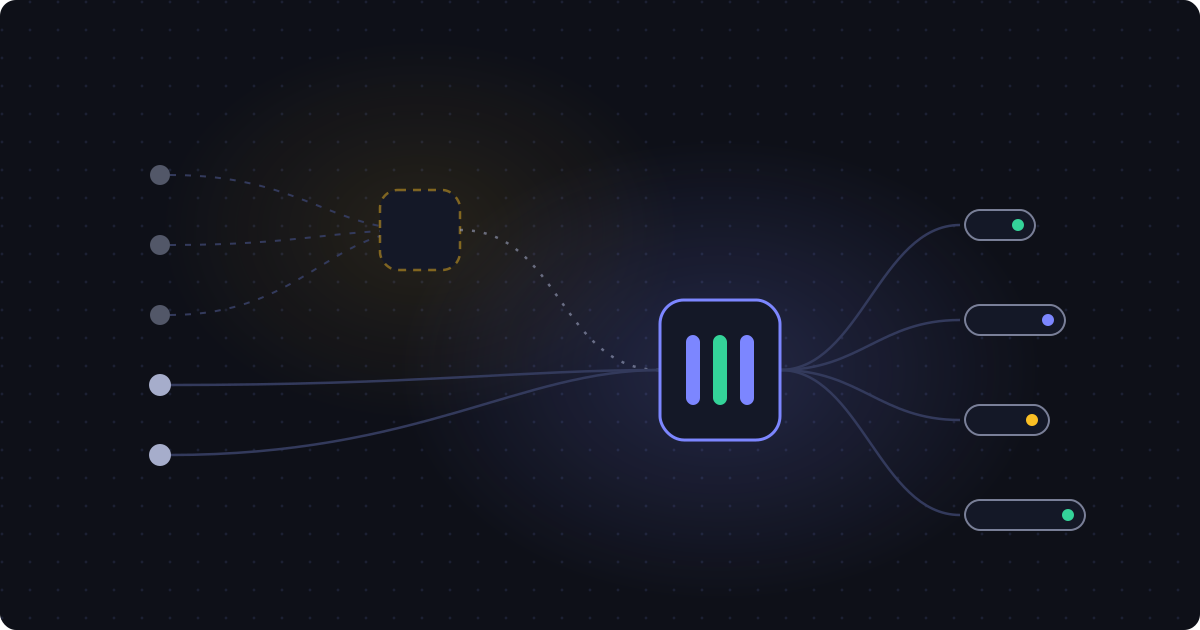
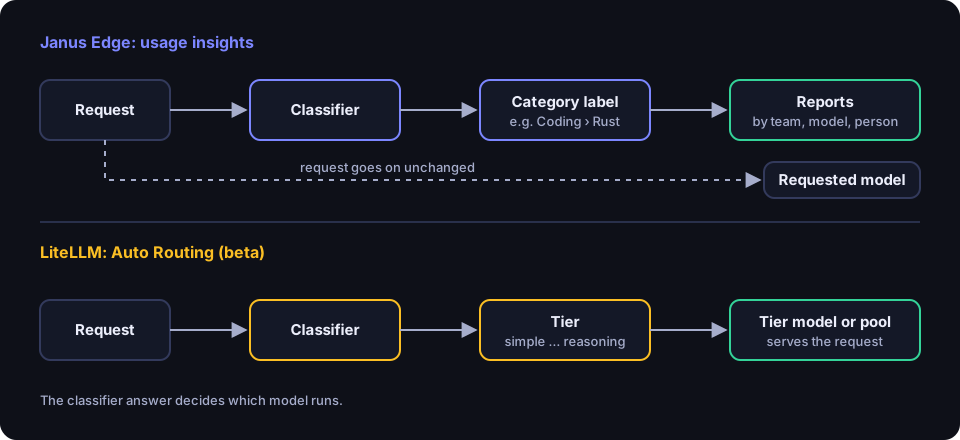
Both products now run small classifier models on request text, and both can use the answer to choose a model. Janus also uses it to label and report on traffic.
Janus Edge: usage insights and decision-model guards
Janus Edge’s usage insights label each sampled chat request with a category from a set you control: 22 built-in categories such as Coding, Legal and Writing and editing, plus your own categories and one level of subcategories, for example Rust under Coding. Reports show categories over time, the models, people and teams behind each one, and the classifier’s own latency, failures and cost. Janus stores only the label, its confidence and the timing, never the prompt, and deletes results after a retention period you set (180 days by default). Classifier calls never count against the caller’s quota.
The classifier can be a decision model that speaks the System One API, such as TypeSafe Jev, Bespoke Nimble, Laya or Cloudflare Clef, served by TypeSafe, OpenRouter, Ollama or llama.cpp. It can also be any chat model Janus can reach, asked to answer in JSON. A hosted classifier receives your prompts, and a self-hosted one keeps them on your network. Labelling runs in the background by default and adds no latency. Inline mode labels the request before forwarding it and returns the label in an X-Janus-Category response header, waiting no longer than your timeout; a classifier failure never fails the request.
The same decision model can also back the prompt-injection and content-safety checks, as an alternative to Llama Prompt Guard 2 and Llama Guard. Model-backed checks run in parallel, so a request waits for its slowest guard, and checks bound to the same decision model share one call when the model answers questions independently. Those guards observe in every edition and block on Business. A built-in benchmark measures the wait your classifier choices add at increasing concurrency.
Janus Edge: auto-routing
Janus auto-routing, included in every edition, lets callers ask for one router name, such as auto/smart or auto/legal. For each request a decision model answers which routing category the work falls into and, when a route needs it, how difficult it is on a 1 to 5 scale. The router sends the request to the first route that fits, matching on category, difficulty band, context fit, grant and quota, and to its default model otherwise. There are 15 built-in routing categories, or a route can follow a usage insights category, and templates include Cost saver, Keep specialist work on-prem, Effort scaler and Coding by difficulty. Routes can set thinking as requested, fixed or scaled with difficulty. A follow-up message is classified with the recent conversation as context, so “keep going” on a hard coding task stays hard coding. Conversations stay on their route for 30 minutes by default, and an unsure, slow or failed classifier serves the default, so routing never fails a request. A route that targets a pool or a fallback alias needs Business for that alias.
Routers start in Draft, can run in Shadow, where the default serves while Janus records what it would have done, and then go Live. Route evaluation answers a sample of a route’s requests with the default as well and has a judge model compare the two blind, twice with the order swapped, with cost against the default; prompts and answers are not stored. Router instructions add text to the system prompt per router, route or default, so a route can change the kind of answer and not only the model.
The same decision models protect children through Child Safety, which replaced the earlier Family router and Parental controls policy templates in Janus Edge 2026.10.5. Rules attach to each child, or a team of children, with an age range, and follow them to every model they can use. Six categories, such as homework done for them and feeling low or unsafe, are each set to off, answer appropriately or block; a tutor rule never gives the final answer, and the critical safety categories always block in both directions. Child Safety, blocking included, works in every edition.
LiteLLM: Auto Routing
LiteLLM’s Auto Routing, currently marked beta, classifies each request and sends it to a tier: simple, medium, complex or reasoning. The classifier can be a heuristic scorer that makes no API calls, an LLM classifier, TypeSafe’s Jev through the same System One API, keyword rules, or your own plugin. Each tier maps to a model, a random pool, or an adaptive pool, and an opt-in session affinity setting keeps a conversation on one model so provider-side prompt caches stay warm. Every decision is logged with its cause, and LiteLLM reports estimated savings against a baseline of the most expensive model in the hardest tier, net of the classifier’s cost. The built-in Jev and LLM classifiers work without an Enterprise license; custom tier definitions or replacement instructions need one.
Both products can now send easy prompts to cheaper models. LiteLLM reports estimated savings; Janus measures quality against the default with a judge. If your goal is also to know what kinds of work people use AI for, team by team, while keeping prompts out of storage, Janus Edge’s usage insights are built for that question.
Routing, reliability and caching
LiteLLM’s open source build falls back from one model group to another after retries. Janus Edge publishes stable aliases like chat-default in every edition (managed aliases), and automatic fallback to a second model needs Business (automatic fallback).
For self-hosted GPU servers, Janus Edge’s load-balanced pools read each vLLM or llama.cpp server’s live load and keep each conversation on the server that holds its cache, using a session header, prompt_cache_key or the conversation’s opening (load-balanced pools). A pool with more than one member needs Business. LiteLLM offers similar opt-in checks that pin a caller, a session or a cacheable prompt prefix to the same deployment.
Where LiteLLM is the better fit
If you want to change the gateway itself, LiteLLM’s MIT license is the more permissive starting point, and a Python team will find the code familiar. The same library also works as an SDK inside your own applications.
Breadth is LiteLLM’s other strength: more than 100 providers, endpoints beyond chat such as images, audio, batches and rerank, an MCP gateway, an A2A agent gateway, and integrations with many third-party services, from Langfuse to Lakera. Teams that run everything as configuration in Git will feel at home, and new releases ship weekly.
If routing between cheap and expensive models is the main reason you want a gateway, both now do it; LiteLLM’s Auto Routing adds a heuristic scorer that makes no API calls and a built-in savings estimate. Finally, a small platform team of up to five administrators can use LiteLLM’s SSO for free.
Where Janus Edge is the better fit
Janus Edge suits the case where the gateway serves the whole company rather than only developers. Sign-on through your identity provider is included in every edition, grants deny access until you give it, and keys stay tied to named people. IT runs it from the admin console that ships in the same binary, and the same binary includes Janus Chat, a chat page (a preview in this release) where people use their granted models with the same grants, quotas, policies and metering as API traffic. Other chat apps, such as Open WebUI, keep working through the API. Because both products accept OpenAI-format requests, trying them side by side mostly means changing a base URL and a key (OpenAI-compatible API).
It also suits teams that want guardrails without extra services. Secret, PII and codename detection run inside the gateway, the free edition can observe before you enforce, and one decision model on your own hardware can back injection checks, safety checks and usage reports.
Janus Edge ships as one binary, container image and Helm chart (single binary), and starts on built-in SQLite with PostgreSQL for production and no Redis (SQLite or PostgreSQL). Every edition installs and licenses offline (air-gap ready). Pricing is per active seat and can be bought online, and the first 25 people are free.
Sources
LiteLLM sources, all accessed October 6, 2026:
- LiteLLM README and license: https://github.com/BerriAI/litellm and https://github.com/BerriAI/litellm/blob/main/LICENSE
- LiteLLM releases: https://github.com/BerriAI/litellm/releases
- LiteLLM Enterprise documentation (OSS vs Enterprise, licensed guardrails, version support): https://docs.litellm.ai/docs/enterprise
- LiteLLM Enterprise page: https://www.litellm.ai/enterprise
- SSO for the Admin UI: https://docs.litellm.ai/docs/proxy/admin_ui_sso
- Virtual keys: https://docs.litellm.ai/docs/proxy/virtual_keys
- Budgets and rate limits: https://docs.litellm.ai/docs/proxy/users
- Logging and stored request content: https://docs.litellm.ai/docs/proxy/ui_logs
- Guardrails quick start: https://docs.litellm.ai/docs/proxy/guardrails/quick_start
- Presidio PII masking: https://docs.litellm.ai/docs/proxy/guardrails/pii_masking_v2
- Built-in content filter: https://docs.litellm.ai/docs/proxy/guardrails/litellm_content_filter
- Secret detection (Enterprise): https://docs.litellm.ai/docs/proxy/guardrails/secret_detection
- Guardrail policies: https://docs.litellm.ai/docs/proxy/guardrails/guardrail_policies
- Auto Routing: https://docs.litellm.ai/docs/proxy/auto_routing
- Fallbacks: https://docs.litellm.ai/docs/proxy/reliability
Janus Edge facts come from our feature pages and pricing.
LiteLLM is a trademark of its respective owner. This page is not affiliated with or endorsed by the LiteLLM project.